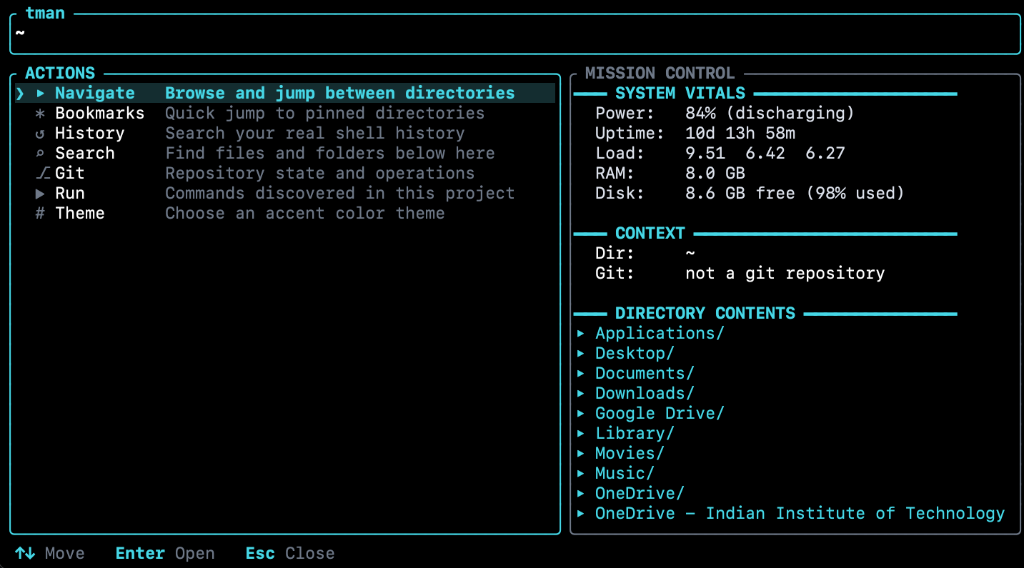
Press Ctrl+Shift+T or Ctrl+Space anywhere in your active shell to trigger an ephemeral full-screen control center. Inspect vitals, switch directories, run project workflows, and traverse command history instantly.
Try the interactive simulator or inspect the real live terminal overlay.
Everything you need from your shell without tmux splits, multiplexer gymnastics, or leaving your prompt.
No persistent background server running in the background. Pressing your hotkey spawns a sub-millisecond ephemeral layer that owns the terminal buffer and releases it cleanly.
Direct kernel inspection of battery percentage, CPU load averages, physical RAM, disk capacity, and Git working tree state via native OS APIs (sysfs/procfs on Linux, sysctl on macOS).
Automatically inspects repository roots and synthesizes runnable commands for Cargo, npm/pnpm/yarn/bun, Python venvs/pytest/poetry, Go, Docker Compose, Make, CMake, and Just.
Pin your most frequent directories with a single key (b). Jump directly to them or `cd` seamlessly straight back into your shell prompt.
Pulls your live command history with deduplication and fuzzy sub-sequence matching. Auto-cleans timestamp clutters and pre-fills complex commands for editing.
Press Tab on any file or folder to trigger actions: open in default application (`xdg-open` / `open`), launch file manager, or copy absolute paths into Wayland/X11/macOS clipboards.
Designed for pure keyboard navigation with familiar Vim keys and standard shell shortcuts.
| Key | Context | Action |
|---|---|---|
| Ctrl+Shift+T / Ctrl+Space | Shell | Toggle HUD overlay (Ctrl+Space is ideal on Linux) |
| ↑ ↓ or j k | Navigation | Move cursor selection |
| Enter | Any View | Execute selected action / cd into folder |
| → or l | File Browser | Enter highlighted directory |
| ← or h / Backspace | Submenus | Navigate to parent directory / previous view |
| b | Menu / Files | Bookmark current directory or highlighted folder |
| d or x | Bookmarks | Delete highlighted bookmark |
| Space | Git Changed Files | Stage / unstage highlighted file in-place |
| Q | File Browser | Quit HUD and cd shell into the browsed directory |
| Tab | Browser / Runners | Open action menu (Open with app, Open in file manager, Copy path) |
| / | Lists | Filter items with multi-word fuzzy search |
| . | File Browser | Toggle hidden dotfiles |
| m | Submenus | Return to main menu |
| Esc | Any View | Clear search / close modal / exit HUD |
One command. That's it.
Paste this in your terminal — it installs tman and wires up your shell hook automatically:
curl -fsSL https://raw.githubusercontent.com/IamShreshth/Tman/main/files/install.sh | bash
Then reload your shell: source ~/.zshrc · Press Ctrl+Shift+T to open tman.
Same single command — auto-detects your distro, arch (x86_64 / aarch64), and libc (glibc / musl):
curl -fsSL https://raw.githubusercontent.com/IamShreshth/Tman/main/files/install.sh | bash
Then reload your shell: source ~/.bashrc · Use Ctrl+Space on Linux (many terminals intercept Ctrl+Shift+T).